Ceiling Fan Light Flickering as a Troubleshooting Signal
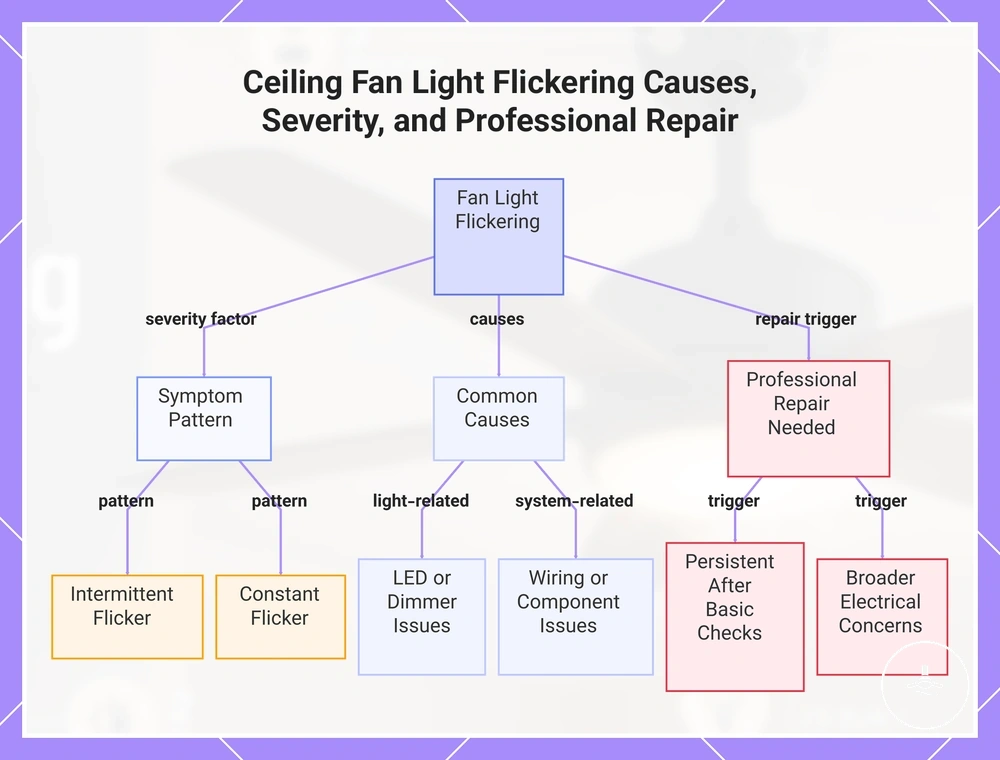
Ceiling fan light flickering is a symptom, not a diagnosis. Start with when the flicker occurs: a change after replacing a bulb points first to LED compatibility; flicker during dimming or remote operation points first to the control layer; flicker that affects other lights or persists across settings needs wiring, supply, or internal-component assessment. If flicker is accompanied by a burning smell, crackling, visible arcing, or repeated breaker trips, stop using the affected circuit and arrange qualified electrical assessment.
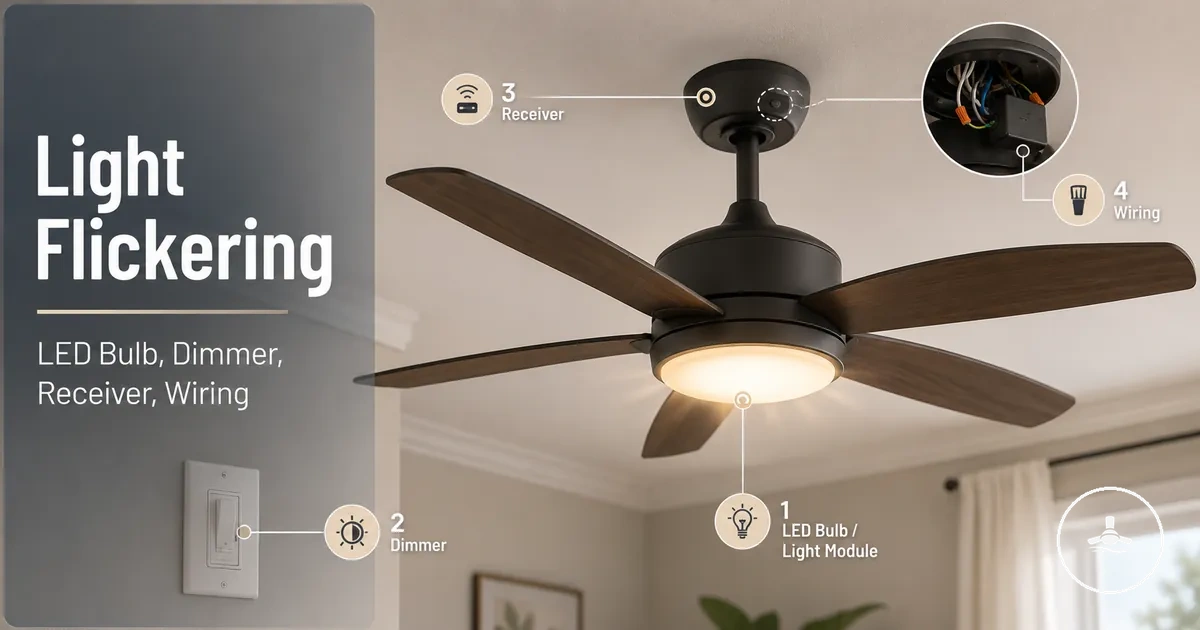
Flicker pattern → first diagnostic branch
Use the two observations below to choose the most useful first check. The result identifies a diagnostic branch; it does not confirm a fault.
Start with bulb seating/type and LED compatibility, then check controls, wiring/supply conditions, and internal lighting electronics only if the earlier checks do not explain the pattern.
Do not open or work on energised wiring to test a theory. A broader electrical symptom or any sign of heat, arcing, crackling or repeated breaker operation warrants a safety-first assessment.
Troubleshoot from the least invasive checks to deeper fault domains: bulb seating/type and LED compatibility → dimmer and control behaviour → remote receiver or smart control → electrical supply and wiring → LED driver or control electronics. A pattern tied to one bulb or control setting usually deserves a local compatibility check first; a pattern that appears in other lights or persists across normal settings deserves broader electrical assessment.
What Ceiling Fan Light Flickering Indicates and How Flicker Patterns Relate to Different System Conditions and Fault Types
A flicker pattern helps classify the first fault domain to inspect, but it does not identify a cause on its own. Intermittent, continuous, pulsing and load-sensitive flicker can arise from LED/driver compatibility, control behaviour, supply instability or internal electronics, so timing and operating conditions matter more than the word “flicker” by itself. For wider fixture context, see the ceiling fans with lights guide.
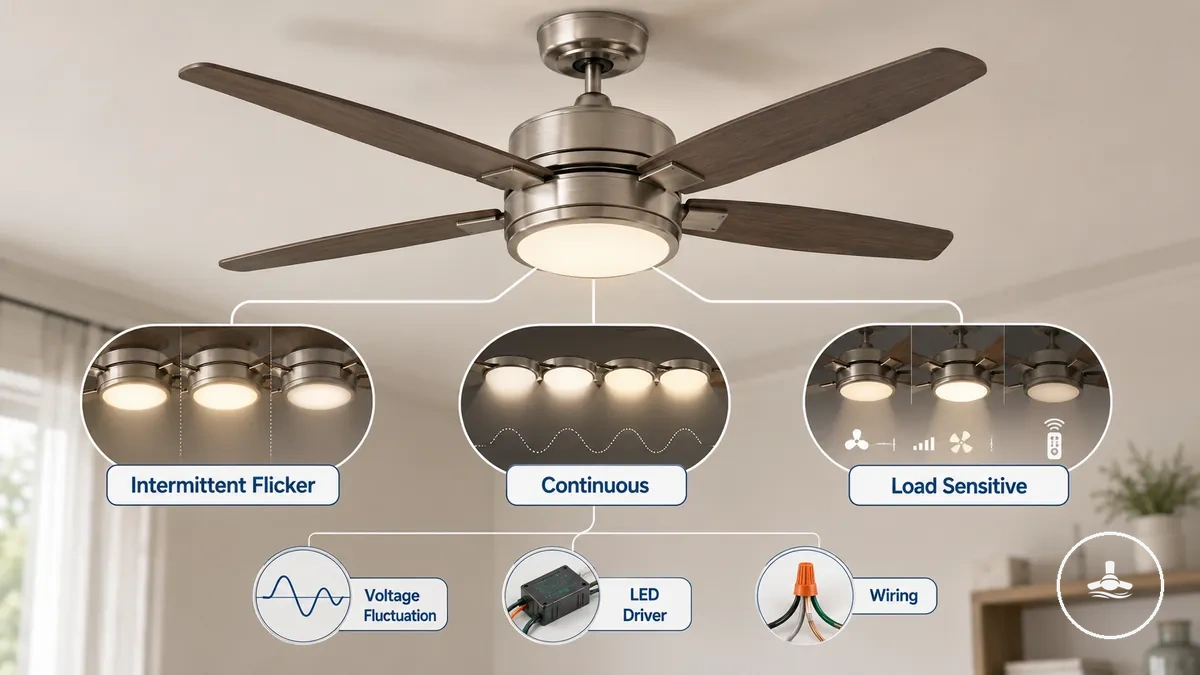
Read the pattern before naming the cause
| Pattern | Possible fault domains | First useful observation |
|---|---|---|
| Intermittent | Loose lamp/contact, control transition, intermittent wiring or supply condition | Note whether it coincides with switching, fan operation, or another electrical load. |
| Continuous or pulsing | LED driver/compatibility, dimmer response, supply fluctuation, or internal lighting electronics | Check whether the pattern changes with another compatible bulb or with a different permitted control setting. |
| Load- or brightness-sensitive | Dimmer/load compatibility, control electronics, or supply interaction | Note the brightness level or electrical event at which the flicker starts or stops. |
| Widespread | Supply, circuit, neutral, or connection issue beyond the fan light | Check whether other lights flicker at the same time; if they do, treat the symptom as broader than the fixture. |
Use these patterns to choose a diagnostic branch, not a diagnosis. The next sections separate bulb compatibility, dimmer/control behaviour, wiring/supply conditions and internal lighting electronics.
LED Bulb Compatibility Issues and Non-Dimmable LED Mismatch as a Common Cause of Ceiling Fan Light Flickering
LED compatibility is the relationship between the lamp, its electronic driver, the fan-light fitting and any control used with it. A bulb can be serviceable yet still flicker if its driver does not operate stably with the fixture or control. When flicker begins after a bulb change, compatibility is the first local check, not proof that the bulb itself is defective. See LED brightness and dimming for the related dimming context.
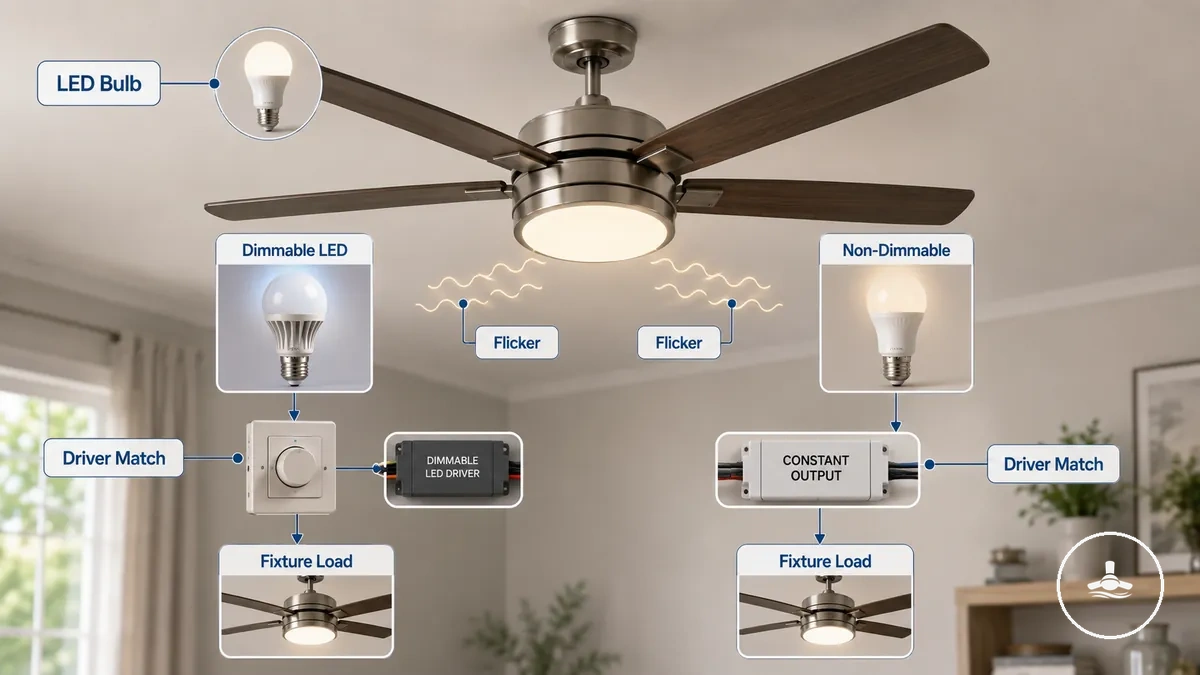
A dimmable LED is designed for compatible brightness control, whereas a non-dimmable LED is intended for essentially constant-output operation. If the fan light is dimmed, the lamp and control both need to be specified as compatible; the exact minimum load or supported lamp type depends on the equipment, so use the fan/light and control documentation rather than assuming one universal threshold.
Bulb compatibility check
| Bulb / condition | Required relationship | What flicker suggests | Practical check |
|---|---|---|---|
| Dimmable LED | Lamp, fixture/driver and control must operate compatibly across the used brightness range. | Flicker can still occur if the driver and control/load combination is unstable. | Confirm the lamp is suitable for the fan light and for the installed dimming/control method. |
| Non-dimmable LED | Intended for constant-output use rather than electronic dimming. | Flicker or unstable output under dimmed or modulated power points first to a use/compatibility mismatch. | Do not use a non-dimmable lamp as a dimmable lamp; follow the fitting and control specifications. |
| Flicker began after bulb replacement | The new lamp changed one part of the electrical/load relationship. | The timing raises the probability of lamp/driver compatibility compared with a pre-existing wiring fault. | Re-check bulb type, seating and permitted lamp specification before moving to deeper diagnosis. |
A change in flicker immediately after replacing the bulb is useful evidence for a compatibility branch, but it is not conclusive. If a correctly specified lamp behaves the same way, continue to the dimmer/control, wiring/supply and internal-electronics checks.
Dimmer Switch Incompatibility and Low-Load Dimming Behaviour Causing Intermittent Flickering in Ceiling Fan Lights
Dimmer compatibility depends on the control type, the LED driver and the connected lighting load. Some electronic dimmers need a load and driver response that stays within their supported operating range; when that relationship is poor, the light can pulse, shimmer, drop out or flicker at part of the dimming range. The relevant threshold is model-specific, so a universal minimum wattage should not be assumed.
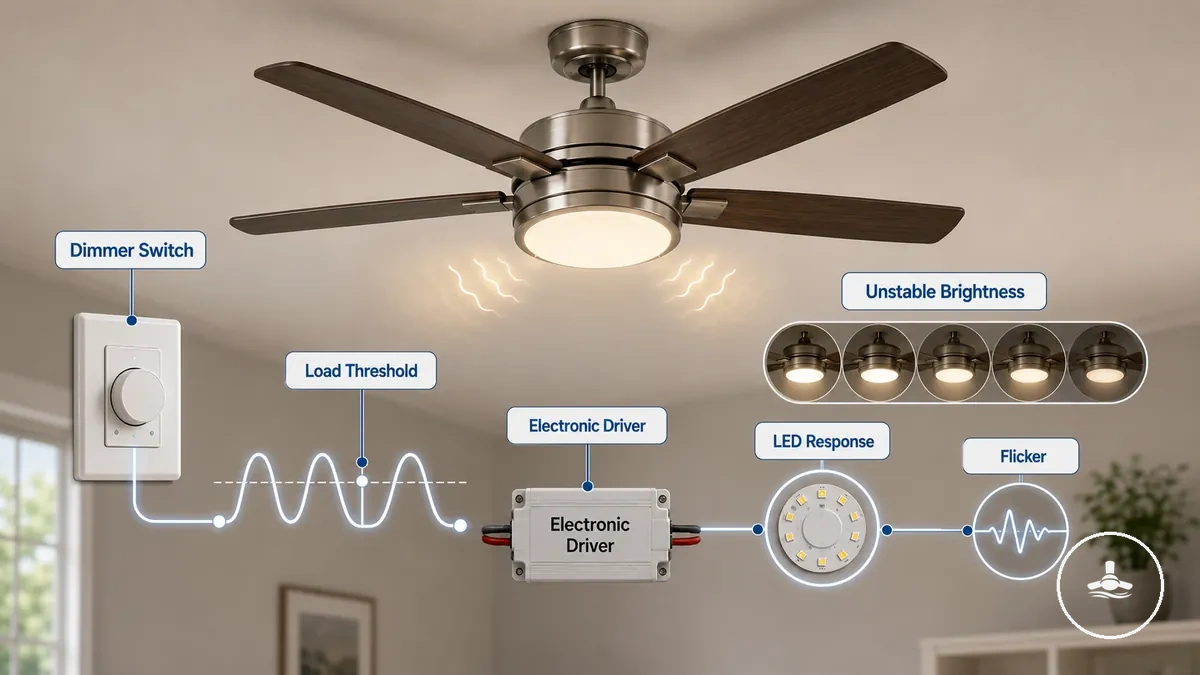
If flicker appears only at low brightness, while moving the dimmer, or at one part of the brightness range, check the dimmer–driver–load relationship before treating the lamp as faulty. The LED brightness and dimming guide covers that relationship in more detail.
Separate lamp compatibility from dimmer compatibility
| Fault domain | Primary relationship | Stronger clue | Next check |
|---|---|---|---|
| LED compatibility | Bulb/driver ↔ fan-light fitting | Flicker changed when the bulb was replaced or occurs even without brightness changes. | Verify bulb type, dimmability, seating and fitting requirements. |
| Dimmer compatibility | Dimmer/control ↔ LED driver ↔ connected load | Flicker appears or worsens at a particular dimming level or while brightness is being changed. | Verify that the dimmer/control and LED load are designed to work together; use equipment-specific load guidance. |
Both conditions can look similar, so the timing of the flicker is the key distinction: bulb-linked change favours the lamp/driver branch, while brightness-linked change favours the dimmer/control branch.
Remote Receiver and Smart Control Module Instability Leading to Intermittent or Irregular Ceiling Fan Light Flicker
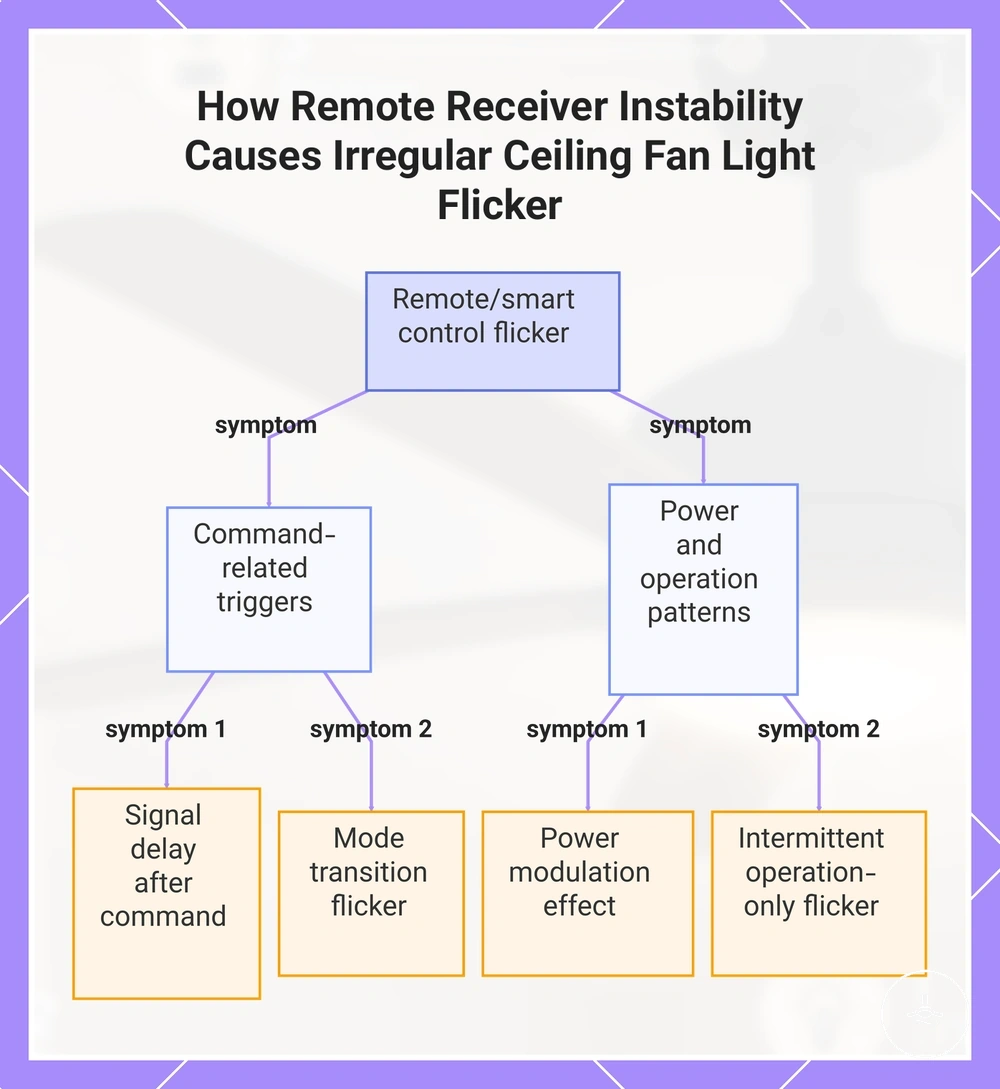
A remote receiver or smart control sits between the user's command and the fan/light electronics. If flicker occurs specifically when a command is received, a mode changes or the control modulates light output, the control layer becomes the first diagnostic branch. That timing does not by itself prove the receiver is faulty, because the same command can expose a driver or compatibility problem.
Compare the light when it is steady with the moment a remote or smart-control action occurs. A symptom that is tightly linked to the command is more informative than an irregular flicker that also occurs when no command is being sent.
Control-linked flicker clues
| Control event | Observation | Interpretation / next check |
|---|---|---|
| Switching command | Brief flicker occurs immediately as the receiver changes the light state. | Check whether the event is repeatable with the same command; if it is, keep diagnosis in the control/driver branch first. |
| Mode transition | Irregular output appears only while changing operating modes. | Compare behaviour before, during and after the transition; steady operation outside the transition makes a constant supply fault less likely. |
| Brightness modulation | Flicker appears at certain control levels. | Check the receiver/dimmer and LED-driver compatibility rather than assuming a radio-signal problem. |
| No control action | Flicker continues independently of remote or smart-control use. | Move beyond the control branch to bulb compatibility, wiring/supply and internal electronics. |
The image below illustrates the same distinction visually: control-linked timing is the useful clue, while flicker that occurs independently of control actions belongs in a broader diagnostic path.
Wiring Issues, Loose Electrical Connections, and Voltage Fluctuations Affecting Ceiling Fan Light Stability
If flicker is not tied to a bulb change or a control action, the next question is whether the instability is local to the fan light or shared by the electrical supply. Loose connections, neutral problems and supply fluctuations can all change light output, but flicker in other lights at the same time is a strong reason to treat the symptom as broader than the fixture. The wiring requirements for fan lights guide explains the related installation context.
Use observable scope rather than opening wiring: compare this fan light with other lights and note whether flicker coincides with switching large electrical loads. A single pattern cannot confirm a loose or neutral connection, so electrical inspection should remain a qualified task.
Local fixture symptom or broader electrical symptom?
| Observed symptom | Possible electrical condition | Safe interpretation / action |
|---|---|---|
| Only this fan light flickers | Local connection, lamp, control or fixture electronics remain possible. | Complete the non-invasive bulb/control checks before escalating to wiring inspection. |
| Other lights flicker at the same time | Circuit, neutral or supply instability becomes more relevant. | Treat the symptom as broader than the fan light and arrange electrical assessment if it persists. |
| Flicker changes when other loads switch | Voltage/supply interaction or a connection issue may be involved. | Record the repeatable pattern; do not open energised connections to test it. |
| Heat, crackling, arcing or repeated breaker trips | Potential electrical safety fault. | Stop using the affected circuit and seek qualified electrical assessment. |
Fixture-level compatibility and supply-level instability are different fault domains. If the scope points toward the electrical supply, use the electrical safety checks as the next context rather than assuming the fan light itself is the source.
Internal Electrical Components Such as Capacitors and LED Drivers Contributing to Flickering Behaviour in Ceiling Fan Lighting Systems
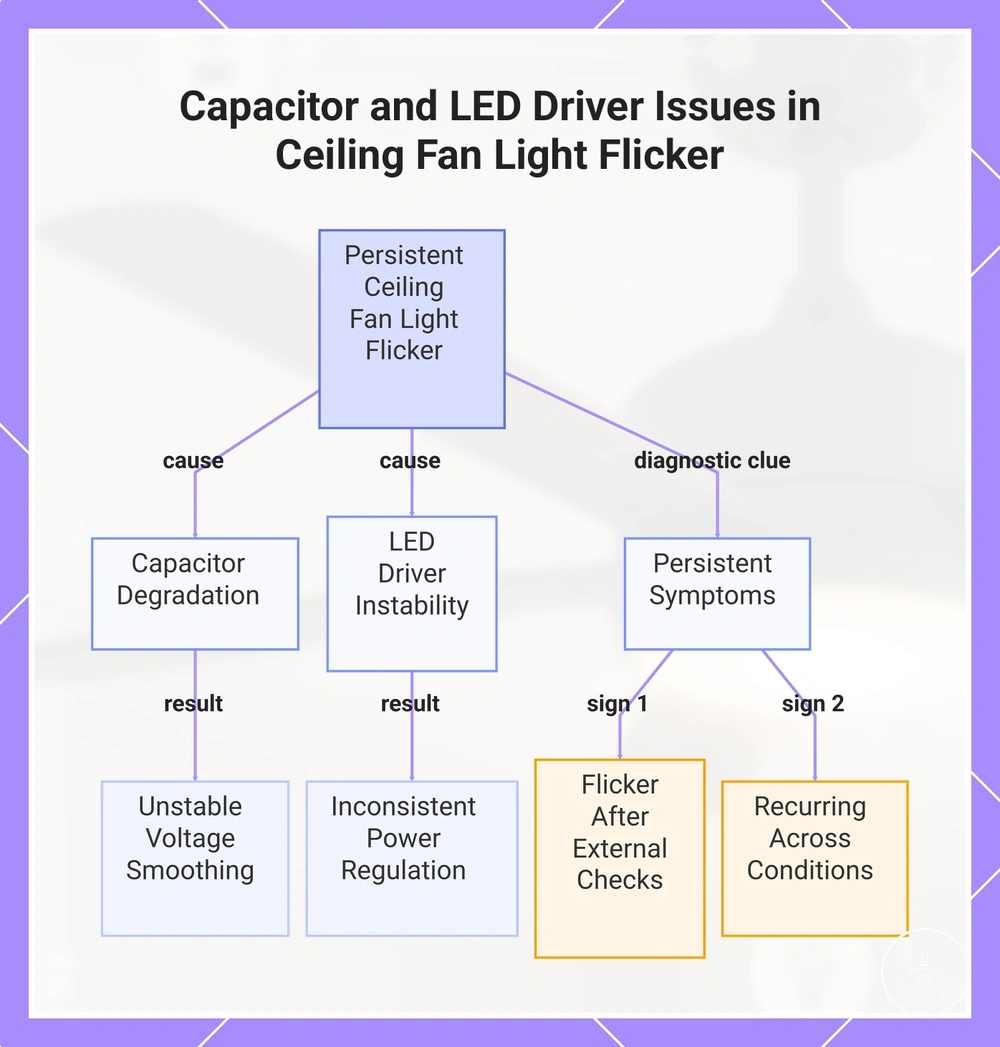
Internal lighting electronics become more relevant when flicker persists after compatible bulb/control checks and does not map clearly to a broader supply event. In an integrated LED system, the LED driver regulates power to the light; capacitors inside the driver or control electronics can also contribute to smoothing and regulation. This is different from assuming that any motor capacitor in the ceiling fan controls the light.
A recurring pattern across normal control settings is a reason to keep internal driver/control electronics in the diagnosis, especially after external compatibility factors have been ruled out. If the light progresses from flicker to partial or complete failure, see light not working troubleshooting.
Internal component EAV check
| Entity | Normal function | Possible failure state | Practical implication |
|---|---|---|---|
| LED driver | Converts/regulates power for the LED light source. | Unstable regulation can produce recurring flicker or brightness fluctuation. | Consider this branch after lamp/control compatibility and broader supply clues have been checked. |
| Driver/control capacitor | Supports filtering, energy storage or voltage smoothing within electronic circuitry. | Ageing or degradation can reduce stable output. | The relevant capacitor is the one in the lighting/control electronics; diagnosis or replacement is not a live-DIY check. |
| Control electronics | Switch or modulate the light according to wall, remote or smart-control input. | Unstable switching/modulation can create command-linked or persistent flicker. | Use the timing of the symptom to separate control-linked behaviour from an always-present driver fault. |
The image below visualises how LED-driver and control-electronics instability can appear as persistent flicker after simpler external causes have been excluded.
Step-by-step Methods to Diagnose Ceiling Fan Light Flickering Based on Bulb, Control, Wiring, and Component Checks
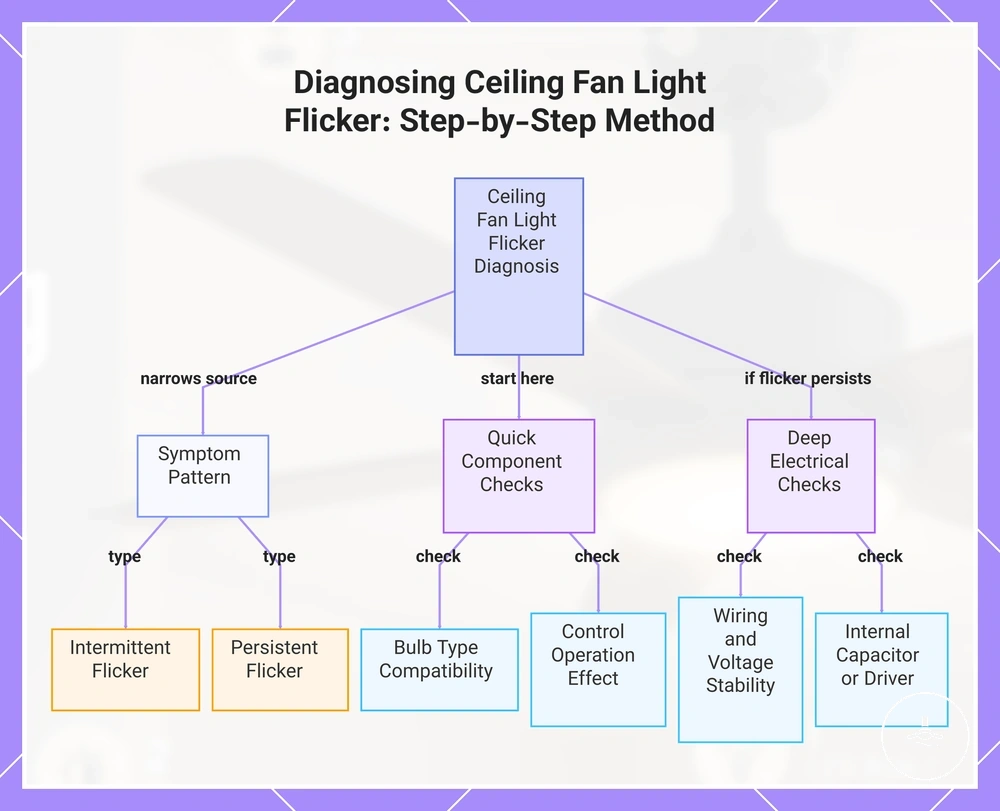
Diagnosis is most reliable when it moves from observable, low-risk checks toward fault domains that require electrical assessment. Change one diagnostic variable at a time so a change in the symptom can be attributed to the bulb, control setting, symptom scope, wiring/supply condition or internal electronics rather than to several changes made at once.
Begin with the components that are easiest to evaluate before moving deeper into the lighting system.
- Check the lamp first. Confirm it is seated correctly and that its type and dimmability match the fan-light fitting and control.
- Observe the control relationship. Note whether flicker begins, stops or changes with dimming, a remote command, smart-control action or mode transition.
- Classify the pattern and scope. Record whether flicker is intermittent or persistent and whether only this fan light or other lights are affected.
- Separate fixture from supply. If other lights flicker too, or the pattern follows other electrical loads, treat wiring/supply conditions as the more important branch.
- Escalate persistent local flicker. After compatible lamp/control checks, recurring local flicker can justify assessment of the LED driver, receiver or other internal control electronics.
- Use the related failure path when needed. If the light becomes unreliable beyond flicker or stops working, continue with light not working troubleshooting rather than repeating the same checks.
This order keeps the diagnosis responsive to the observed pattern without converting a symptom into a premature fault conclusion.
If the pattern remains unresolved, review the electrical safety checks before moving from observation to electrical inspection.
The image below presents the same sequence visually: symptom pattern first, simple compatibility/control checks next, and deeper electrical checks only after the earlier branches remain unresolved.
Frequently Asked Questions About Ceiling Fan Light Flickering Causes, Severity, and When Professional Repair Is Required
- Is ceiling fan light flickering always serious?
- No. A local LED or dimmer-compatibility issue can cause flicker without indicating a broader electrical fault. Severity rises when the symptom is widespread, persistent, accompanied by heat/crackling/arcing, or linked to repeated breaker operation. The ceiling fans with lights guide provides broader fixture context.
- When is professional electrical assessment appropriate?
- Arrange qualified assessment when flicker persists after non-invasive compatibility/control checks, affects other lights, or appears with electrical safety symptoms. Persistent local flicker can involve wiring, the receiver/control module or LED-driver electronics; the visible pattern helps choose the next branch but does not confirm which component has failed.
The image below summarises the same severity boundary visually: isolated compatibility-linked flicker is different from persistent, widespread or safety-related electrical symptoms.